Tuesday, January 31, 2017

SAP LOGISTICS I SAP SD | Order to Cash Cycle

 SAP LOGISTICS I SAP SD | Order to Cash Cycle

SAP SD is a key module in ERP system and is used to manage shipping, billing, selling and transportation of products and services of the organisation.


I manages Customer relationship starting from raising a quotation to sales order and billing of the product or service.

Key Components in SAP SD:
  • Customer and Vendor Data
  • Sales Support
  • Shipping of Material
  • Sales Activities
  • Billing 
  • Transportation
  • Credit Management 
  • Contract Handling and management 
  • Foreign Trade
  • Information System

SAD SD Organizational Structure :
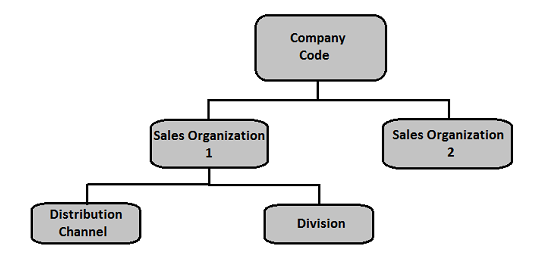
Structure of Sales and Distribution Module

  • Sales organization - Responsible for goods and services.
  • Distribution Channel - Tells by which medium goods or services are distributed by an organization to its end users.
  • Division : Represents product or service line in a single organization. 
  • Sales Area : it comprises of sales org , distribution channel and division.
In SAP SD organizational structure, each sales organization is assigned to a company code. Then the distribution channel and divisions are assigned to sales organization and all of these comprise to make a sales area.

Sales Order

Link PointsModule Involved
Availability CheckMM
Credit CheckFI
CostingCO/MM
Tax DeterminationFI
Transfer of RequirementsPP/MM

Billing

Integration PointModule
Debit A/RFI/CO
Credit RevenueFI/CO
Updates G/l (Tax,discounts,surcharges,etc)FI/CO
Milestone BillingPS

Goods Delivery and Issue of goods

IntegrationModule
Availability CheckMM
Credit CheckFI
Reduces StockMM
Reduces InventoryFI/CO
Reduces EliminatedPP/MM

Master data in SD: 
  • Customer Master
    • Key Tables 
      Table NameKeyDescription
      KNA1KUNNRGeneral Information
      KNB1KUNNR,BUKRSCompany Code
      KNVVVKOGRG,VTWEG,SPART,KUNNRSales Area
      KNBKKUNNR,BANKS,BANKL,BANKNBank Data
      VCNUMCCINS,CCNUMCredit Card
      VCKUNCCINS,CCNUM,KUNNRCredit Card Assignment
      KNVKPARNRContact Person
      KNVPVKORG,VTWEG,SPART,PARVW,KUNNRPartner Functions
    • Key Transaction Codes :
      S.NoTransaction Codes & Description
      1
      XD01, XD02, XD03
      Used to create/change/display customer centrally
      2
      VD01,VD02,VD03
      Used to create/change/display customer sales area
      3
      FD01,FD02,FD03
      Used to create/change/display customer company code
      4
      XD04
      Display change documents
      5
      XD05
      Display change documentsUsed to block Customer − Global, order, delivery, billing, sales area, etc.
      6
      XD06
      Used for deletion
      7
      XD07
      Change Account Group
      8
      VAP1
      Create Contact Person
    • Creation of Customer Master : To create a customer master data, you need to use an Account group
      • XD01 (customer )/VD01 (Sales Area )/FD01 (Company Code):
    • Creation of Partner Function (VOPAN) : Partner function allows you to identify which functions a partner has to perform in any business process. 
    • Partner TypePartner FunctionEntry from SystemMaster Record
      Customer(CU)
      Sold-to Party(SP)
      Ship-to Party(SH)
      Bill-to Party(BP)
      Payer(PY)
      Customer numbercustomer master record
      Vendor(V)Forwarding agent(fwdg agent)Vendor numberVendor master record
      Human Resource(HR)
      Employee responsible(ER)
      Sales Personnel(SP)
      Personnel numberPersonnel master record
      Contact Person(CP)Contact Person(CP)Contact Partner number(created in customer master record,no master record of its own)
    • Create Material Stock : MB1C : Movement Type: 561 this is for Good receipts without reference.
      Movement Type: 501 − this is used for receiving goods with a Purchase Order.
SAP SD - Customer Account Groups :
GroupName
X001Domestic Customers
X002Export Customers
X003One Time Customers
Go to SPRO → SAP Reference IMG → Financial Accounting → AR and AP → Customer Accounts → Master Data → Preparations for creating customer master data → Define Account Groups with screen layout (Customers) → Execute

 :
======================================================

Pre SAles Activiteis :
  • Inquiries  : from customer : VA11 - Create Inquiry
  • Quotation :  legal document to the customer - VA21 .
Sales Order Processing in SAP SD :
  • Availability Check of the article purchased
  • Checking for incomplete data
  • Checking for pricing and taxes
  • Schedule the deliveries of goods
Creation of Sales Order :
  • Different order type available :
  • CRCredit Memo
    GKMaster Contact
    KAConsignment Pick-up
    KBConsignment fill-up
    KEConsignment issue
    FDDelivery free of charge
    CQQuantity contract
    SDSubsequent Del. Free of charge
    KRConsignment returns
    DRDebit memo request
    PVItem Proposal
    REReturns
    RKInvoice correction request
    RZReturns scheduling agreement
    SORush order
    ORStandard Order
  • There are four types of sales documents that can be defined in SAP. To define a sales docuemnt use transaction VOV8.
    1. Credit Memo (VF03)
    2. Debit Memo
    3. Standard Order
    4. Delivery Returns
SAP SD Item Categories VOV4:
  • Used to define if an item is suitable for pricing or billing.
    CategorizationDescription of an Item
    TANStandard Item
    TABIndividual Purchase Order
    TASThird Party Item
    TADService
    TANNFree of charge item
    TATXText item
    AFXInquiry item
    AGXQuotation item
Schedule lines :  VOV6
  • This graphic is explained in the accompanying text 
Copy Control : is defined as a processing which important transactions from one document to other,
  • You can also use the following T-Codes to find copy controls in a system −
    • VTAA − This control is used for copying from sales order to sales order
    • VTLA − This control is used control for copying from sales order to delivery
    • VTFL − This control is used control for copying from delivery to billing doc
    • VTFF − This control is used control for copying from billing doc to billing doc
    • VTAF − This control is used control for copying from billing doc to sales order
    • VTFA − This control is used control for copying from sales order to billing doc
  • VBUK and VBUP (field RFSTK and RFSTA )

SAP SD PRICING : VVIMP
  • used to define the calculation of prices for external vendors or customers and cost. This condition is defined as a set of conditions when a price is calculated.
SAP Pricing
Pricing in Sales and Distribution is used to define the calculation of prices for external vendors or customers and cost. This condition is defined as a set of conditions when a price is calculated.
SAP Condition Record and Table
To identify a special condition record.
A condition record specify how systems stores the specific condition.
Example of a condition record - Entering the price of a product or to specify the discount for a privileged customer.
Example of a condition Table – 005.
-          Customer
-          Material
-          Sales organization
-          Distribution Channel
S.No
Condition Type & Description
1
PR00
Price
2
K004
Material Discount
3
K005
Customer-specific material discount
4
K007
Customer discount
5
K020
Price group discount
6
KF00
Freight surcharge(by item)
7
UTX1
State tax
8
UTX2
Country tax
9
UTX3
City tax

Condition Type->Access Sequence->Condition Record->Procedure

SAP SD - Listing, Determination & Exclusion
Listing − you can create a material list for specific customers, which allows those customers to order only those materials which are maintained in the list.
Exclusion (VB01) − you can also maintain an exclusion record for specific customers and this doesn’t allow that customer to order those materials.
Order type – RE and FD and CF. (Return Delivery and Free of Charge Delivery and Consignment fill up).
Schedule line Category – VOV5 and VOV6.
Inbound Delivery – VL31N.

SAP SD – Shipping
In the shipping process, there are a few key sub processes, which include −
-          Delivery processing of the goods
-          Picking of items
-          Packing of the goods
-          Post goods issue
-          Shipping communication
-          Planning & monitoring of shipping
-          Other functions like batch determination, serial numbers, inspection, etc.

SAP SD Outbound Delivery:
  • -           SAP SD - PICKING , PACKING and PGI
    • - Picking is done via a transfer order which is used for picking list and withdraw goods from stock.
    • Three Types of picking :
      1. Picking of goods individually
      2. picking as per defined intervals
      3. Automatic picking in SAP SD
    • Packing is done with the packing material and to be created as material type 'VERP'.
    • PGI is the last step in delivery processing and in this goods ownership is moved to the customer and stock is updated as per delivery. 
      • Creating an outbound delivery - VL01N
      • Creating Picking Request - LT03
      • Create Packaging - VL02n-> Pack 
      • Creating PGI- VL02n->PGI
    • PGI Creates two documents:
      • Material Document
      • Accounting Document
Billing Documents:
  • VF01
  • VF11 - Cancel a billing doc
  • Vf05 - List all billing doc


Sunday, January 29, 2017

SAP LOGISTICS I SAP MM | Procure To Pay Cycle

SAP (System Application and Products in Data Processing) ERP has many modules.

SAP Logistics is one of them. Logistics are incorporates following modules: 

  • Sales and Distribution, 
  • Production Planning, 
  • Plant Maintenance, 
  • Project Systems, 
  • Warehouse Management 
  • Materials Management module.
    • SAP MM deals with the material management and inventory management
    • MM process ensures that there is never a shortage of materials,
    • SAP MM speeds up the procurement and material management activities making the run business smoother with complete time and cost efficiency.
    • the aim is to accelerating the productivity.
    •  Reducing cost
    • Deals with procurement process, master data (Material and vendor) , account determination and valuation of material, Inventory
Procurement Cycle :
SAP Basic Procurement

A brief introduction of Procurement activities is given below:
Procurement ActivitiesDescription
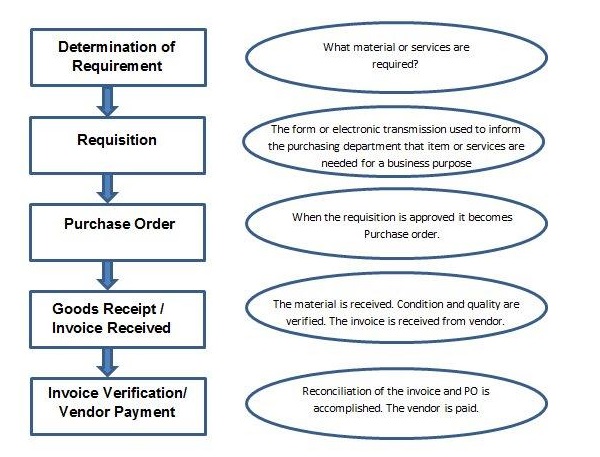
Determination of requirementIt is the logical subdivision where it is determined that what material or services are required to company, and which supplier can fulfill the requirement.
Creating Purchase RequisitionIt is the phase in which purchasing department is informed about the requirement of items or services required for business purpose. A requisition is a internal document.
Creating Purchase OrderIt is the phase when order is created from requisition and it is approved and assigned to a supplier.
Goods receipt/ Invoice ReceivedIt is the phase in which the material is received by the company and the condition and quality are verified. In this phase Invoice is received from the vendor (seller).
Invoice verification/ Vendor PaymentIt is the phase in which the vendor (seller) is paid from the company and reconciliation of the invoice and PO is accomplished.

Procurement for Stock vs Consumption

The following points show the difference of Procurement for Stock vs. Consumption:
  • Procurement for Stock - A stock material is a material that is kept in stock. These materials are kept in stock once received from the vendor. The stock of this material keeps on increasing or decreasing based on amount of the quantity received or issued. To order a material for stock, the material must have a master record within the system.
  • Procurement for Direct Consumption - When procurement is for direct consumption i.e. it will be consumed as soon as it is received, the user should specify the consumption purpose. To order a material for consumption, the material may have a master record within the system.

Special Procurement : 

Consignment Stocks

Material that is available at our store premises, however it still belongs to the vendor (seller)/Owner of the material. If you utilize the material from consignment stocks, then you have to pay to the vendor.

Third-party processing

In third-party processing, a company passes on a sales order to associate external vendor (seller) who sends the goods directly to the customer. The sales order is not processed by your company, however by the vendor (seller). Third-party items can be entered in purchase requisitions, purchase orders and sales orders.

Pipeline handling

In pipeline handling, the company needs not to order or store the material involved. It is obtainable as and when required via a pipeline (for example, oil or water), or another style of cable (such as electricity). The material that is consumed is settled with the vendor (seller) on a regular basis.

Returnable Transport Stock

The company orders goods from a vendor (seller). The goods are delivered with returnable transport packaging (pallets, containers) that belongs to the vendor (seller) and is stored on the customer premises until they return it to the company.

Subcontracting

The vendor (the subcontractor) receives components from the ordering party with the help of which it produces a product. The product is ordered by your company through a purchase order. The components required by the vendor (seller) to manufacture the ordered product are listed in the purchase order and provided to the subcontractor.

Stock transfer using stock transport order

Goods are procured and supplied within a company. One plant order the goods internally from another plant (receiving plant/issuing plant). The goods are procured with a special type of purchase order - the stock transport order. You'll be able to request and monitor the transfer of goods with a stock transport order.

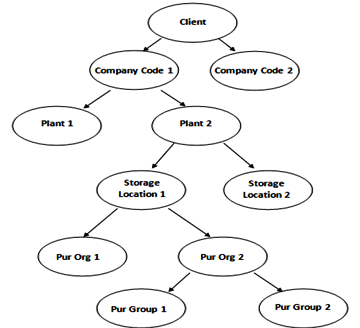
The Organizational Structure in MM consists of following Organizational Levels:
  • Client - Client is a commercial organizational unit in R/3 system.
  • Company Code (OX15 OX02)- Independent accounting unit. 
  • Plant (OX10) - Independent unit where activities take place. A plant produce goods and makes goods available for the company. that has own profit, loss and balance statement.
  • Storage Location(OX09) - differentiates between different material stocks in a plant. where stock is kept physically.
  • Purchasing Organization (OX08) - Purch Org is an org unit under company or plant which is responsible for procurement activities according to requirements. can be company specific or plant specific. 
  • Purchasing Group(OME4) - responsible for everyday procurement activities within an organisation.
Four basic and must assignments in standard SAP are:
  • Plant to Company code - OX18
  • Purchasing organization to company code - OX01
  • Purchasing organization to Plant - OX17
  • Standard purchasing organization to plant - SPRO
SAP Enterprise Structure


SAP MM Master Data :

  • Material Master Data -
    •  Has for characteristics :
      1. Materials Types (OSM2) : Materials with some common properties are grouped  together and they are assigned to a material group. (Raw Material, Finished products)
      2. Material Groups (OMSF) : Material group is a wider range of material type. Materials with some common attributes are taken together and they are assigned to material group. For Example: Suppose we have some materials which need packaging, so there material type can be electrical or food products but we can group these material types and put them in packaged material group. 
      3. Number Range (MMNR): external (you assign manually) Internal (system assign automatically). Number Ranges are defined for each material type.
      4. Material Master Creation (MM01): 
  • Vendor Master Data - this data will include information on vendors from which a company can procure or it can sell. Information like vendor name and address. data is divided in three categories :
      1. General Data : maintained at client level valid for all org levels
      2. Accounting Data : maintained at company level 
      3. Purchasing Data : maintained at purchasing org level. 
    • Vendor master has 3 characteristics :
      1.  Vendor Account Group (OBD3)
      2.  Number Range (XDN1)
      3. Creation of Vendor Master (XK01)
Procure to Pay Cycle 
The steps which are required to procure a material in right quantity and at the right price, forms the Procure to Pay Cycle.

  1. Determination of the requirement : What material or service is required by the company and which supplier can provide this.
  2. Purchase Requisition ( ME51N) : Internal request to purchasing. PR converted to RFQ/PO/routine agreement. 
  3. RFQ (ME41): Either can be created manually or automatically from PR. 
  4. Purchase Order (ME21N) : Is a formal and final confirmation of the requirement which is sent to the Vendor to supply material or services. Delivery date, quantity,price, reference etc. TYpes of POs in MM are :
      • Standard PO
      • Subcontracting PO - Item Category L
      • Consignment PO - Item Category K
      • Stock Transfer PO - Item Category U
      • Service PO - Item Category D 
      • Planned PO
      • Contract PO
  5. Posting Goods Receipt (MIGO) : After Processing of PO by Vendor , goods are delivered to the ordering party and his process in called goods receipt. So, goods receipt is a process in which goods are received by the ordering party and the condition and quality are verified. Following are the steps for posting goods receipt :
      1. GO to MIGO.
      2. Fill all the necessary details like movement type (101 for goods receipt), name of the material, quantity received , details of storage location and plant where material going to be stored.
      3. Save .
  6. Posting Invoice (MIRO): This is the phase where the Vendor is paid from the company and reconciliation of the invoice and PO is accomplished. Below are the steps for posting invoice :
      1. goto MIRO.
      2. Fill necessary details like invoice posting date, amount that is paid to vendor along with quantity.
      3. Click on save.

Inventory Management : It deals with following terms :
    1. Movement Type - Describes he type of stock posting in inventory.  It represents the posting in stock is due to which type of order, like if stock is posted against goods receipt or goods issue.The Important movement types are :
      1. 101 - Goods Receipt for PO 
      2. 103 - GR for PO in GR blocked stock 
      3. 201 - Goods Issue for a cost center 
      4. 261 - Goods issue for an order
      5. 301 - transfer posting plant to plant in one step 
      6. 305 - transfer posting plant to plant in two steps - placement in storage 
      7. 311 - transfer posting to storage location to storage location in one step
      8. 313 - Stock transfer storage locations to storage location in two steps - removal from storage
      9. One step transfers of materials can be posted using movement type 301. Other movement types are 303, 351, 641, or 643 in the stock transport order.
    2. Goods Receipt MIGO - When order is received by ordering party. and condition and quality are verified. 
    3. Reservation (MB21/MMBE) - Sometimes stock need to be blocked in advance so it can be available for a particular point of time. this is known as reservation.
    4. Goods Issue MIGO -  moving stock out of inventory , this will result in decrease in quantity in warehouse.
Invoice Verification MIRO:
Blocked Invoice - To release blocked invoice use MRBR.

T-CodeDescription
OX15Create Company
OX02Create Company Code
OX10Create Plant
OX09Create Storage Location
OX08Create Purchasing Organization
OME4Create Purchasing Group
OX18Assign Plant to Company Code
OX01Assign Purchasing Organization to Company Code
OX17Assign Purchasing Organization to Plant
MM01Create Material
MM02Change Material
MM03Display Material
MB51Material Document List
MMDEDelete All Materials
MMNRDefine Material Master Number Ranges
XK01Create Vendor
XK02Change Vendor
XK03Display Vendor
ML33Create Vendor Conditions
ME11Maintain Purchasing Info Record
ME01Maintain Source List
ME51NCreate Purchase Requisition
ME52NChange Purchase Requisition
ME53NDisplay Purchase Requisition
ME41Create RFQ/Quotation
ME42Change RFQ/Quotation
ME43Display RFQ/Quotation
ME31LCreate Scheduling Agreement
ME32LChange Scheduling Agreement
ME33LDisplay Scheduling Agreement
MEQ1Create Quota Arrangement
MEQ2Change Quota Arrangement
MEQ3Display Quota Arrangement
ME21NCreate Purchase Order
ME22NChange Purchase Order
ME23NDisplay Purchase Order
ME29NRelease Purchase Order
ME59NAutomatic generation of Purchase Order
MIGOPost Goods Movement
MB1AGoods Withdrawal
MB1BTransfer Posting
MB1CPost Other Goods Receipts
MB01Post Goods Receipt for Purchase Order
OMJJCustomizing: Define New Movement Types
MIROEnter Incoming Invoice
MIRAFast Invoice Entry
MR8MCancel Invoice Document
MRBRRelease Blocked Invoices
OMR6Tolerance limits: Invoice Verification
MIR5Display List of Invoice Documents
MIR6Invoice Overview
MIR7Park Invoice
MRISSettle Invoicing Plan
AC02Service Master
ML81NCreate Service Entry Sheet
MRRLEvaluated Receipt Settlement
MMB1Create Semi Finished Product
MMF1Create Finished Product
MMG1Create Returnable Packaging
MMH1Create Trading Goods
MMI1Create Operating Supplies
MMK1Create Configurable Material
MMN1Create Non-Stock Material
MMBEStock Overview
MB52List of Warehouse Stocks on Hand
MB21Create Reservation
MBSTCancel Material Document
MB5TStock in Transit


.

Friday, April 22, 2016

OData in SAP Part 1

Source : SCN Post

How internet works:
- Your request a URL using web browser.
- Web browser sends your request to the web server using HTTP. ( HTTP defines the semantics of what the browser and web server can communicate to each other ).
- Web server then sends back HTTP response to your browser. (HTTP is stateless because, every single request received by the server is forgotten after a response has been sent across. web servers do not process HTTP requests by remembering the previous request).
- Browser parsed that HTTP response and prepare a DOM tree. DOM stands for document object   model and it is a language independent convention for representing objects in HTML.

URI vs URL:


GET and POST Methods :
- When you type a string in google search page and press enter, it actually generates a HTTP request with GET method in background. (Retrieve information from server)
- When you login to some web page using username and password and press enter, it actually generates a HTTP request with POST method in background. (send data to server)

HTTP Response:
- HTTP response comes with data and a status code.
- HTTP codes are 3 digit integers.
Code and Description
1xx: Informational
It means the request has been received and the process is continuing.
2xx: Success
It means the action was successfully received, understood, and accepted.
3xx: Redirection
It means further action must be taken in order to complete the request.
4xx: Client Error
It means the request contains incorrect syntax or cannot be fulfilled.
5xx: Server Error
It means the server failed to fulfill an apparently valid request.

For example, status code 400 means Bad Request. It means that the server did not understand the request.


Thursday, July 2, 2015

SAP ABAP ALV

There are total four types of views, based on the way in which the view is implemented and the methods that are permitted for accessing the view data. They are - Database Views, Projection Views, Maintenance Views, and Helps Views,.


Among these four types of database views, only 'Database Views' implements INNER JOIN, rest all implements an OUTER JOIN. The detail description of each views has been discussed further below.

- Database View (SE11)

Database views are implement an inner join, that is, only records of the primary table (selected via the join operation) for which the corresponding records of the secondary tables also exist are fetched. Inconsistencies between primary and secondary table could, therefore, lead to a reduced selection set.

- Help View ( SE54)

Help views are used to output additional information when the online help system is called.

When the F4 button is pressed for a screen field, a check is first made on whether a matchcode is defined for this field. If this is not the case, the help view is displayed in which the check table of the field is the primary table. Thus, for each table no more than one help view can be created, that is, a table can only be primary table in at most one help view.

 - Projection View

Projection views are used to suppress or mask certain fields in a table (projection), thus minimizing the number of interfaces. This means that only the data that is actually required is exchanged when the database is accessed.

A projection view can draw upon only one table. Selection conditions cannot be specified for projection views.

- Maintenance View ( SE54 )

Maintenance views enable a business-oriented approach to looking at data, while at the same time, making it possible to maintain the data involved. Data from several tables can be summarized in a maintenance view and maintained collectively via this view. That is, the data is entered via the view and then distributed to the underlying tables by the system.
========================================================================
ABAP Reports:
classical and interactive:
- SY-LSIND - list number from 0 to 21.
- SY-lisel - contains data of selcted line.
- Interactive report events:

  1. At line selection
  2. AT user command 
  3. AT PFn
  4. TOP-OF-PAGE during line selection

ABAP Report Types
ABAP report types are those ones available in some report's attributes screen, i.e. :
Executable program
Function group (containing function modules)
Include
Interface pool
Class pool
Module pool
Subroutine pool
=======================================================================

========================================================================

ABAP List Viewer :
Also ALV means ABAP List Viewer. Most convenient way to use it is through reuse library (cf. transaction se83) available from release 4.6 of SAP R/3.
ALV is available in two modes: list and grid. List mode is good old list processing with standard functionnalities, and grid mode is using a new OCX object displaying grids 

CALL FUNCTION 'REUSE_ALV_GRID_DISPLAY'
       EXPORTING
            I_CALLBACK_PROGRAM       = 'Prog.name'
            I_STRUCTURE_NAME         = 'I_ITAB'
            I_DEFAULT                = 'X'
            I_SAVE                   = 'A'
       TABLES
            T_OUTTAB                 = I_ITAB.
  IF SY-SUBRC <> 0.
    WRITE: 'SY-SUBRC: ', SY-SUBRC .
  ENDIF.

- FM REUSE_ALV_COMMENTRY_WRITE to add logo in your report output.
- you can first upload image in tcode OAER.

- REFRESH_TABLE_DISPLAY to refresh the alv grid.
- I_SOFT_REFRESH , used to display only Icons.
========================================================================

SALV:

        CALL METHOD CL_SALV_TABLE=>FACTORY
          IMPORTING
            R_SALV_TABLE = O_ALV
          CHANGING
            T_TABLE      = T_MARA.
      CATCH CX_SALV_MSG INTO LC_MSG .
    
* Calling Set PF status method
    CALL METHOD SET_PF_STATUS
      CHANGING
        CO_ALV = O_ALV.       "set_end_of_page
* Calling the top of page method
    CALL METHOD SET_TOP_OF_PAGE
      CHANGING
        CO_ALV = O_ALV.
* Calling the End of page method
    CALL METHOD SET_END_OF_PAGE
      CHANGING
        CO_ALV = O_ALV.
************************************************************************
* Displaying the ALV
* Here we will call the DISPLAY method to get the output on the screen
************************************************************************
    O_ALV->DISPLAY( ).

 METHOD SET_TOP_OF_PAGE.
    DATA: LO_HEADER TYPE REF TO CL_SALV_FORM_LAYOUT_GRID,
          LO_H_LABEL TYPE REF TO CL_SALV_FORM_LABEL,
          LO_H_FLOW  TYPE REF TO CL_SALV_FORM_LAYOUT_FLOW.

========================================================================
Reuse_ALV_GRID:
ALL FUNCTION 'REUSE_ALV_GRID_DISPLAY'
      EXPORTING
        i_callback_program          = sy-repid
        i_callback_top_of_page      = 'TOP-OF-PAGE' "see FORM
        i_callback_html_end_of_list = 'END_OF_LIST_HTML' "see FORM

*       is_layout                   = gd_layout
        it_fieldcat                 = li_fcat[]
        i_save                      = 'X'
      TABLES
        t_outtab                    = li_mara
      EXCEPTIONS
        program_error               = 1
        OTHERS                      2.
========================================================================
SPILIT Container :

  1. Create a custom container for  cl_gui_custom_container.
  2. Create O_DD_DOC for CL_DD_DOCUMENT.
  3. Create split container for CL_GUI_SPLITTER_CONTAINER for 2 rows and 1 column.
  4. create 2 containers for CL_GUI_CONTAINER.
  5. Assign first part of ( row 1 ) to container 1.
  6. Assign part 2 to container 2.
  7. Create a grid for container 2 for CL_GUI_ALV_GRID.
  8. Then create a local class and method for TOP_OF_PAGE event of grid.
  9. do set handler and rise event,
  10. ADD_TEXTADD_PICTUREADD_GAP, etc. ADD_TEXT is used to add the text and also you can specify the color,font size,font type.